All guide chapters
Start here
Everyday running
- Residents
- Rent and payments
- Dues and reminders
- Deposits and advances
- Expenses and profit
- Mess and meals
- Reports and dashboard
- Laundry and food for residents
- Importing residents safely
- Room changes, checkout and resident requests
- Payment approvals
- Billing periods, installments and rent reviews
- Room electricity and resident charges
- Utility connections and bills
- Inventory and room assets
- Bank accounts and wallets
Filling your beds
Your team and residents
Laundry and food for your residents on Houstel.pk
Local laundries and kitchens, checked by Houstel, can sell to your residents in their app. Residents order and pay them directly; you choose whether they see it.
Step by step
Where to go: My Hostel → Laundry & Food
Who can use it: The hostel owner, or staff allowed to edit the hostel profile. Staff who may only view the hostel profile can open the page but not save it.
-
Choose what your residents see
Open My Hostel → Laundry & Food. Outside laundry and Outside food are on until you turn them off; each shows how many businesses deliver to you. Save.
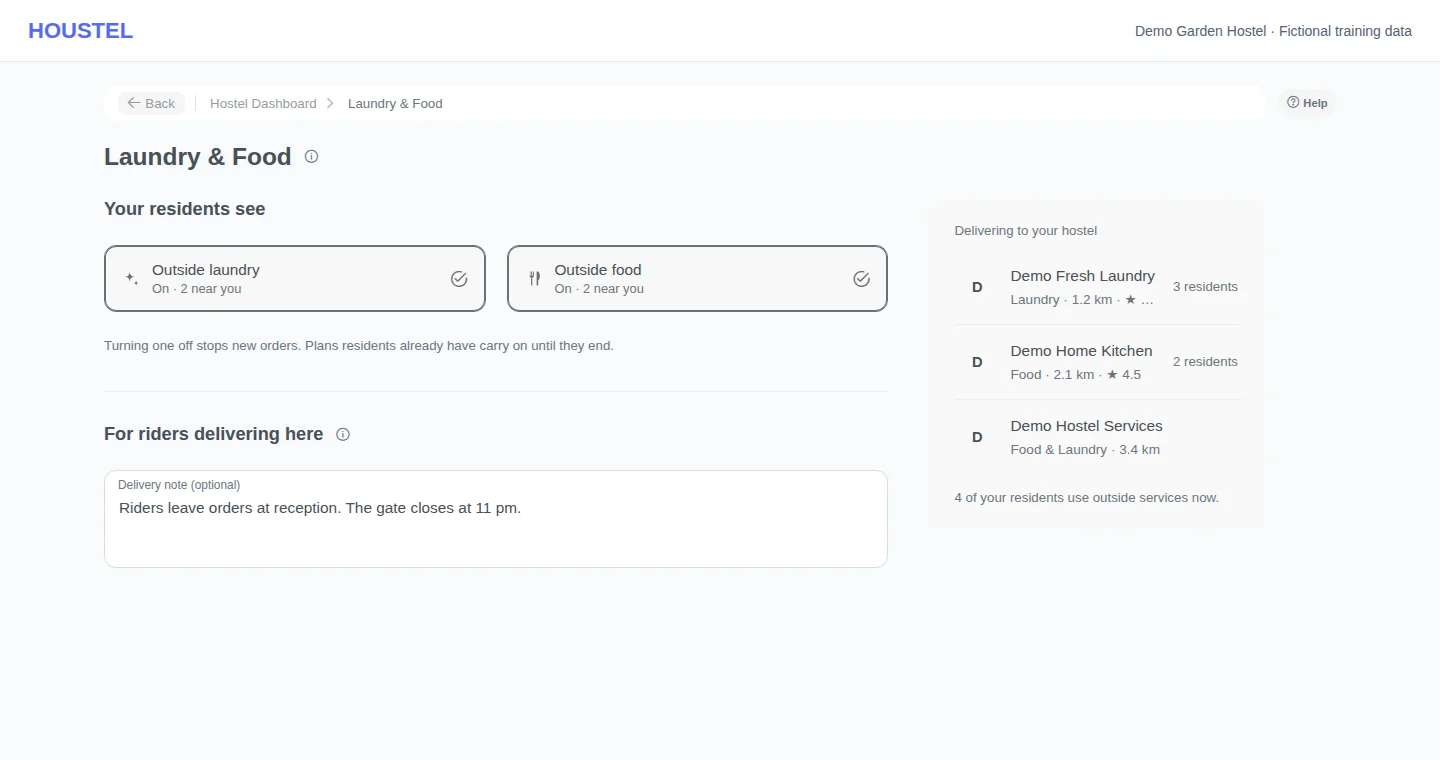
Choose what your residents see · Example with dummy data. Select the image to enlarge. -
Tell riders where to deliver
Add a delivery note, such as where to leave orders and when the gate closes. Every business delivering to your hostel sees it on each order.
-
Know what residents see
Residents living in your hostel open Laundry & Food in their app: their own orders first, then the businesses that deliver to you, best rated first, with prices. They order and pay the business directly, and are asked to rate it once it is served.
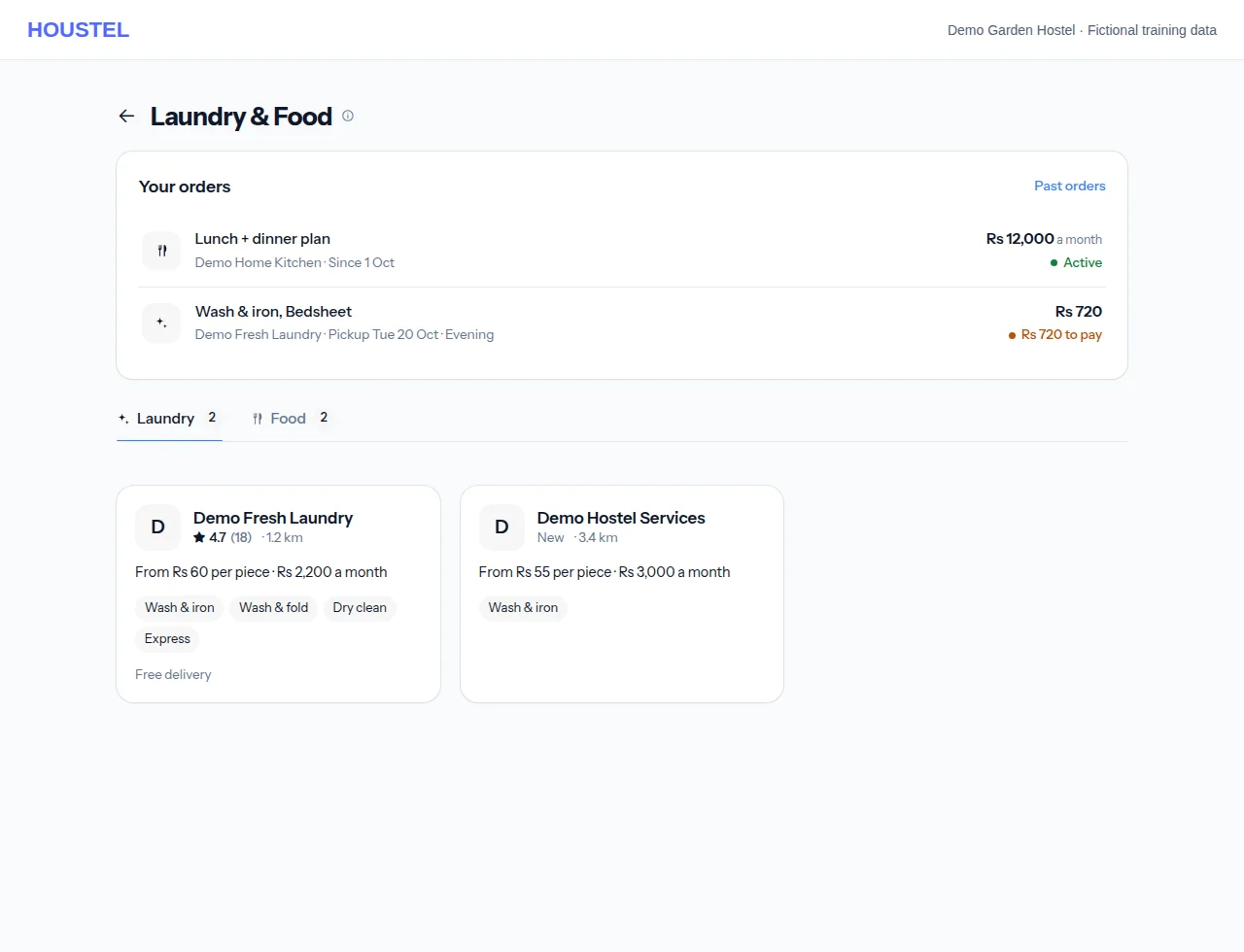
Know what residents see · Example with dummy data. Select the image to enlarge.
Before you finish, and when something goes wrong
- No business listed means none delivers to your hostel yet; nothing needs setting up on your side.
- Turning a switch off stops new orders only. Monthly plans residents already have carry on until they end.
- You see how many residents use each business, not who or what they ordered. Report a problem business through Chat with Houstel.
- If saving says you do not have permission, ask the owner to allow editing the hostel profile on Hostel Staff.
If a save times out, check the record before repeating it. If access is denied, ask the owner to review your hostel assignment and permissions. Never share your login to work around an access restriction.
Related help
Most residents already send their washing to a laundry down the road and order food from someone's kitchen when the mess is not enough. Houstel lets those local businesses offer their services to your residents inside the resident app, with their prices, so residents order and keep track in one place, and you stop being the middleman for phone numbers.
How it works
- Local businesses sign up themselves and Houstel checks each one before residents can see it. They list what they sell and their prices: laundry by the piece, kilo or monthly package, food by the day or monthly plan. Each business chooses where it delivers (the areas it names, a distance from its shop, or the whole city) and the days each service runs.
- Your residents see only businesses that deliver to your hostel, under Laundry & Food in their app, best rated first.
- Residents order and pay the business directly: cash, JazzCash, Easypaisa or bank transfer, whichever the business takes. Nothing goes through your accounts, nothing appears on a resident's rent, and you pay nothing for it.
- The business answers every order. An order it does not accept in time is cancelled for the resident, so nobody waits for food that is not coming.
Choosing what your residents see
My Hostel → Laundry & Food. Two switches: Outside laundry and Outside food. Both are on until you turn them off, and each shows how many businesses currently deliver to you.
- Turning one off stops new orders of that kind from your residents. Monthly plans they already have carry on until they end, because that is an arrangement between the resident and the business.
- If you run your own mess, your mess menu and charges are not affected. Outside food is extra, for residents who want something else. Turn it off if you would rather they did not see it.
- Only residents living in your hostel can order to your hostel. Anyone, resident or not, can also order to a home or office address of their own; your switches do not cover those orders and you never see them.
- When a resident checks out, their running plans to your hostel end by themselves and the business is told. Laundry already collected still comes back.
What riders are told
On the same page, the delivery note is shown to every business on every order for your hostel: where to leave things, gate timings, who to ask for. For example, “Leave orders at reception. The gate closes at 11 pm.”
Who delivers to your hostel
The page lists the businesses that reach your hostel, how far away they are, their rating, and how many of your residents use each one right now.
You see how many residents use a business, never who or what they ordered. What a resident buys from a laundry is between them and the laundry. The business gets the resident's name, phone and room to deliver, and the resident is told that before they order.
What your residents see
- Their own orders first. A monthly food plan or laundry package stays there for as long as it runs, with each month's bill.
- The laundries and kitchens near your hostel, with prices, delivery times and reviews from other residents.
- For a monthly plan: pause it for a few days (the paused days are added to the end of their month), or stop it from the end of the month.
- For a laundry package: book a pickup whenever they need one. Pieces over the package are billed separately.
- After an order is served, Houstel asks them how it went: a short survey by email and in the app (stars, on time or not, quality, worth the price). Ratings are shown with a shortened name, and businesses are listed best rated first.
If there is a problem with a business
- A late or missing order: the resident calls or messages the business from their order. Order details, payments and the business's answers are all on the order.
- A complaint about a business, from you or a resident: tell Houstel through Chat with Houstel. Houstel can stop a business from taking new orders.
- A business you know that is not listed: they can sign up at admin.houstel.pk/provider/join. It is free to join; Houstel keeps a small share of what customers pay them. How it works for them: Sell laundry or food on Houstel.
You, and staff allowed to edit the hostel profile. Staff without that permission see the page blocked; ask the owner to change their access on Hostel Staff.
In short
- Local laundries and kitchens, checked by Houstel, can sell to your residents in their app, best rated first.
- Residents order and pay the business directly; it does not touch your rent or your books.
- My Hostel → Laundry & Food: turn outside laundry or food off, and add a note for riders.
- You see how many residents use each business, never what they ordered.
- Plans end by themselves when a resident checks out.
Common questions
Do I pay anything, or collect the money?
No. Residents pay the business directly, and nothing goes on their rent or through your accounts. The business pays Houstel a small share.
Can I see what my residents order?
No. You see how many residents use each business, never who or what they ordered.
Which businesses come first?
The best rated, from short surveys residents and other customers answer after an order is served. A business with many good reviews ranks above one with a single 5-star review.
Still stuck?
Tell us the screen name, what you tried and what happened. Remove personal details, passwords and private links from any screenshot.