All guide chapters
Start here
Everyday running
- Residents
- Rent and payments
- Dues and reminders
- Deposits and advances
- Expenses and profit
- Mess and meals
- Reports and dashboard
- Laundry and food for residents
- Importing residents safely
- Room changes, checkout and resident requests
- Payment approvals
- Billing periods, installments and rent reviews
- Room electricity and resident charges
- Utility connections and bills
- Inventory and room assets
- Bank accounts and wallets
Filling your beds
Your team and residents
Approval, and getting your hostel live
Every new hostel is checked by our team before it appears publicly. Approval is only half of it. There are five things that must all be true before your advert shows on Houstel.pk.
Step by step
Where to go: My Hostel → hostel details
Who can use it: The hostel owner, or staff with access to this feature. Some actions need additional permission.
-
Complete your listing
Review the hostel details, rooms, photos and the listing switch. Correct the fields highlighted as incomplete.
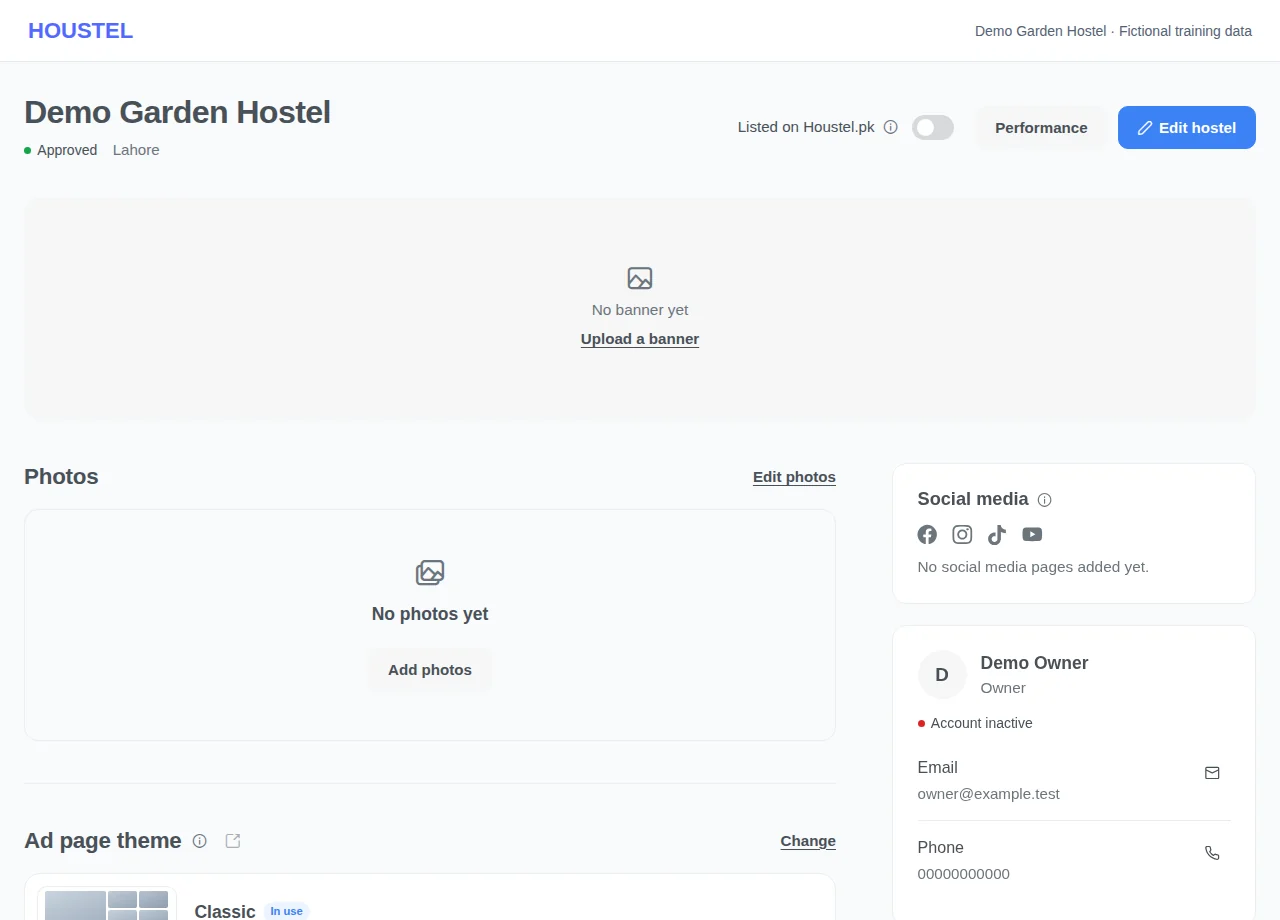
Complete your listing · Example with dummy data. Select the image to enlarge. -
Check public visibility
Follow the approval state shown and open the public page after approval. If the page is not live, check every eligibility condition below before contacting support.
-
Recognise an Unverified directory listing
Illustrative images and an Unverified label distinguish entries awaiting ownership and listing review. Use Request nearby options for alternatives, or Claim This Hostel if you own it.
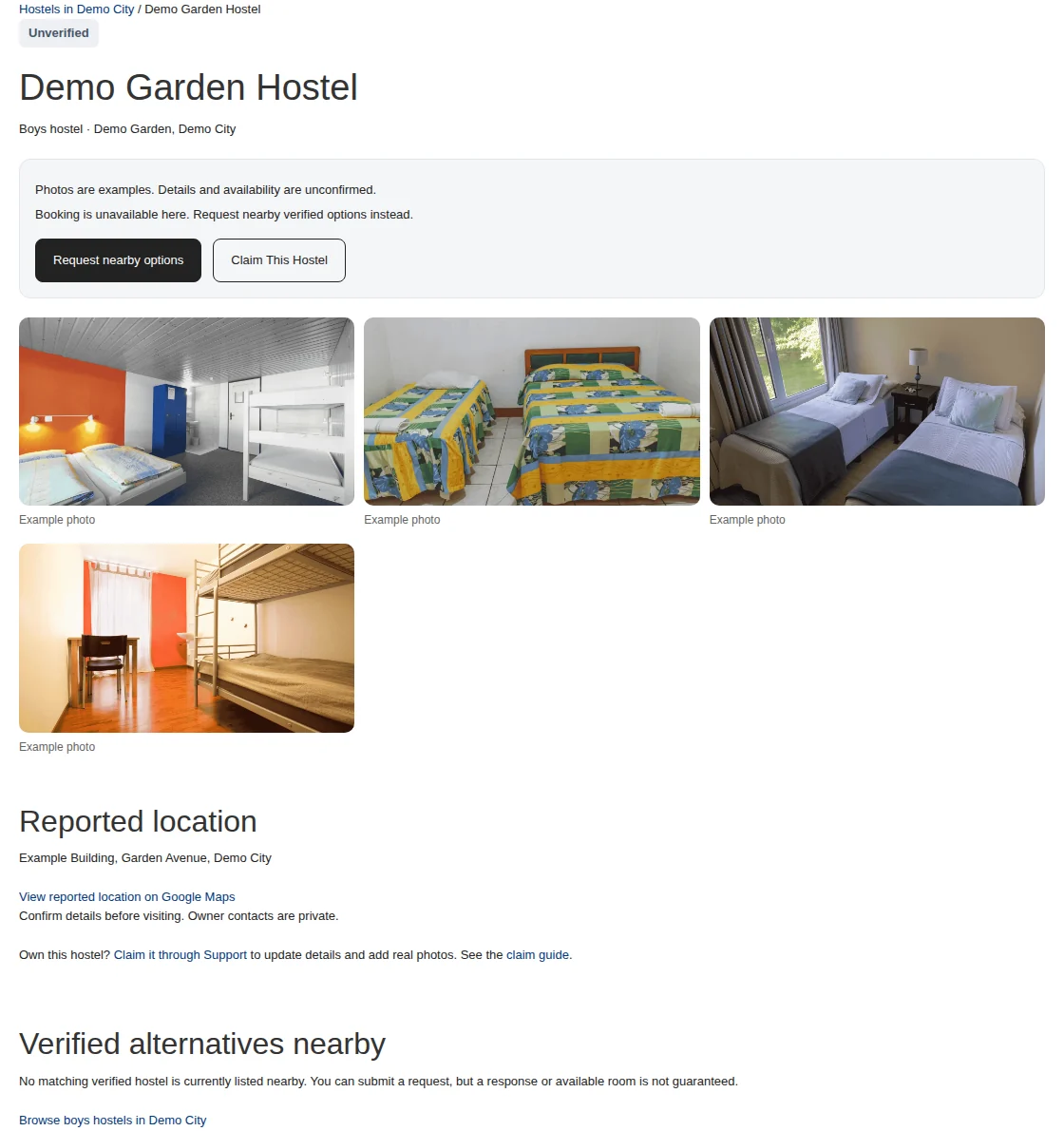
Recognise an Unverified directory listing · Example with dummy data. Select the image to enlarge.
Before you finish, and when something goes wrong
- An approved hostel can still be hidden when its listing requirements are no longer met. A theme or advert purchase does not override those requirements.
- Unverified directory entries can be public before ownership approval, with private contacts, illustrative images and no visit or reservation promises. Daily indexing eligibility does not guarantee indexing.
If a save times out, check the record before repeating it. If access is denied, ask the owner to review your hostel assignment and permissions. Never share your login to work around an access restriction.
Related help
Unverified directory listings
Some directory entries appear publicly before ownership has been checked. They are clearly labelled Unverified, appear after verified results, and use labelled illustrative images rather than photographs of that hostel. Address and map information may be outdated. Their owner phone numbers and contact details stay private.
These pages cannot confirm availability, book a visit or reserve a bed. Their Request nearby options action asks for consent to share an accommodation request with relevant nearby verified hostels. It does not contact or book the unverified hostel.
Directory pages initially ask search engines not to index them. Up to 100 eligible pages a day can become indexable and enter the directory sitemap after quality and duplicate checks, including useful location details and nearby verified alternatives. Fewer may qualify. Indexability is not a promise of search-engine inclusion or ranking. A withdrawn, disabled or unsuitable entry is removed from public availability or indexing as appropriate.
To correct an entry you own, follow Claim This Hostel. After ownership is checked, at least three actual hostel photos, a floor and a room are required before the listing review can approve a claimed entry. Ordinary listing and booking switches still apply after approval. Use Support to report a duplicate, incorrect location or removal request.
Owner-submitted listings are reviewed before they appear as verified hostels. Unverified directory entries follow the separate process below.
What we check
Nothing difficult. We are looking for a real hostel that a real person could turn up at:
- The hostel exists at the address given, and the map pin is on it.
- The phone number is answered.
- The photos are of that hostel, not stock pictures or another building.
- The details are consistent. A “girls hostel” that describes boys' rooms gets sent back.
- Nothing in the description or rules is offensive or misleading.
Most hostels are approved within a working day. A profile with photos, a correct pin and a working number goes through fastest, because there is nothing for us to come back and ask about.
What you can do while you wait
Almost everything. Listing approval controls whether your hostel can appear as a verified public listing, and it does not hold up your dashboard. While your hostel is pending you can already:
- add floors, rooms and beds
- upload photos and videos
- add your existing residents and assign them rooms
- record rent, expenses and receipts
- add staff and set what each of them can see
So if you are moving off a paper register, start now. By the time you are approved, the hostel is already running in the system.
The five conditions for an ordinary verified public listing
This is the part that surprises people. Approval on its own is not enough. An ordinary verified listing appears when all five conditions below are met and the account remains active. Unverified directory entries are the separately labelled exception:
- Your hostel is approved by our team.
- Your listing is switched on. That is the Listed on Houstel.pk switch at the top of My Hostel. You can turn it off yourself when you are full and back on when you are not.
- You have at least one photo. A listing with no photo gets almost no clicks, so we do not publish one.
- You have at least one floor.
- You have at least one room.
If your hostel is approved and still not showing, look at that switch first. If it is off, turning it on is all it takes. If it is on but something else is missing, the switch reads Not live on Houstel.pk and a box at the top of My Hostel says what to add, with Add photos or Go to rooms beside it. It is almost always one of the last three: a photo, a floor, or a room on that floor. A room you have hidden from Houstel.pk does not count. Your page goes live by itself once the box is cleared, and View live page appears beside your hostel's name.
When you are completely full it is reasonable to switch the listing off rather than field calls you cannot serve. Switch it back on before your notice-period residents leave, not after. Most people looking for a room in September start looking in July.
How you find out
You get a notification in the dashboard, and an email, the moment the decision is made. If your hostel is sent back, the message says why, and fixing it and saving is enough. You do not start again.
After you are approved
Changes you make afterwards go live on their own. Editing your rents, adding rooms, changing photos or updating your description does not need a second approval, and updates usually show on the public page within minutes.
From this point your listing starts bringing you enquiries, visit requests and reservations, and you can see how many people are actually looking at your page under Performance.
If your hostel is rejected
Rejection is nearly always one of three things: photos that do not match the hostel, a phone number nobody answers, or a listing for something that is not a hostel. Fix the cause, save, and tell support you have. We will look at it again. Nothing you have already entered is lost.
In short
- Verified listings are reviewed by the team; unverified directory entries are labelled separately.
- Waiting does not block you. Build your rooms, add residents and record rent in the meantime.
- Five conditions apply to an ordinary verified listing: approved, listing on, at least one photo, at least one floor, at least one room.
- “Approved but not showing” is nearly always a missing photo, floor or room.
- After approval, your edits go live on their own, with no second approval.
Common questions
My hostel is approved but still does not appear on the website.
Approval is one of five conditions. Your listing also needs at least one photo, at least one floor, at least one room, and the Listed on Houstel.pk switch on (top of My Hostel). Any one of them missing keeps the advert hidden.
How long does approval take?
Usually within a working day. A profile with photos, a correct map pin and a working phone number is checked fastest, because there is nothing for us to come back and ask about.
Can I use the dashboard before approval?
Yes. You can add floors, rooms, photos, staff and residents straight away. Approval only controls whether your advert is visible to the public.
Still stuck?
Tell us the screen name, what you tried and what happened. Remove personal details, passwords and private links from any screenshot.