Biometric attendance for hostels
Connect the fingerprint or face machine at your door. See who is inside, who is out and who came back late, live on your phone. Works with ZKTeco, Hikvision and most machines sold in Pakistan.
Rs 2,000 a month per branch, on your Houstel subscription. First 30 days free.
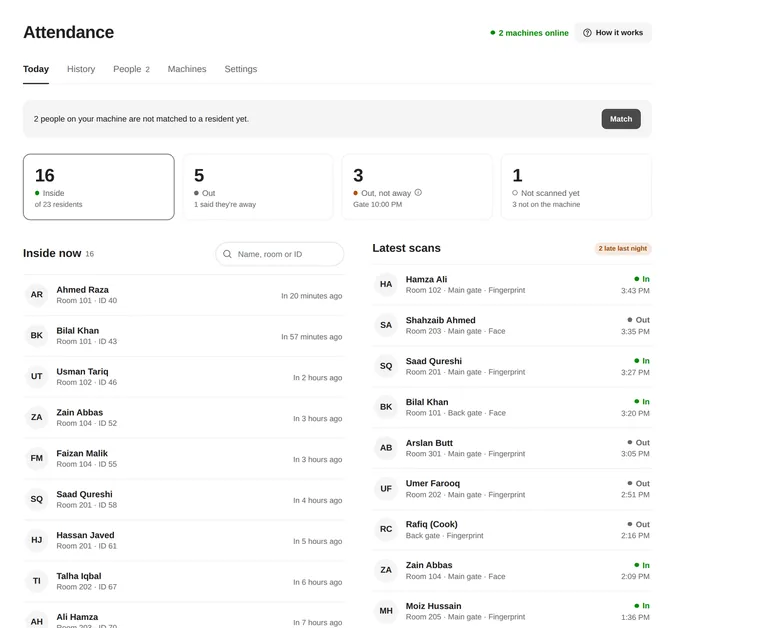
Your machine already records every scan. Now you can read them.
A fingerprint machine on its own keeps a list nobody opens. Connected to Houstel, it answers the questions a hostel owner actually asks.
Who is in, who is out
Every scan appears within seconds. One number tells you how many residents are inside right now, another how many are out.
Late returns and the night gate
Set the time your gate closes. See who came in late, and get one message a night listing who is not back yet.
Leavers lose access
When a resident checks out, Houstel removes them from the machine. New residents are added for you.
Works through load shedding
The machine keeps every scan while the power or internet is off and sends them when it is back. Nothing is lost.
Every door, one list
Main gate, back gate, a girls' wing door, the mess, the staff room. Each machine can be for everyone, residents only or staff only.
Private by design
Residents see only their own entries. Fingerprints stay encrypted and are never shown or exported. No photos are kept.
Works with the machine you already have
No new hardware, no computer in the office, no software to install. If your machine has a Cloud Server or ADMS setting, it connects in about ten minutes.
| Machine | How it connects | What you get |
|---|---|---|
| ZKTeco: K40, K50, MB160, MB360, SpeedFace, uFace, iClock and similar. Also eSSL and Granding. | Type our server address into the machine's Cloud Server (ADMS) menu once. | Live scans, residents added and removed for you, fingerprints copied to your other machines. |
| Hikvision MinMoe face and fingerprint terminals (DS-K1T series) | Set the private address Houstel gives you under HTTP Listening. | Live scans. You enrol people on the terminal with the ID Houstel shows. |
| Other brands that can send data to a web address | Point the machine, or a small program next to it, at a private address. | Live scans. |
| Any machine with a USB port, even with no internet | Copy the attendance log to a USB stick and upload it. | Scans whenever you upload. Uploading the same file twice is fine. |
Not sure about your model? Tell us which machine you have in the form below and we will check before you pay anything.
Connected in about ten minutes
Add your machine
In your Houstel dashboard, open Attendance, then Machines, and type the machine's serial number.
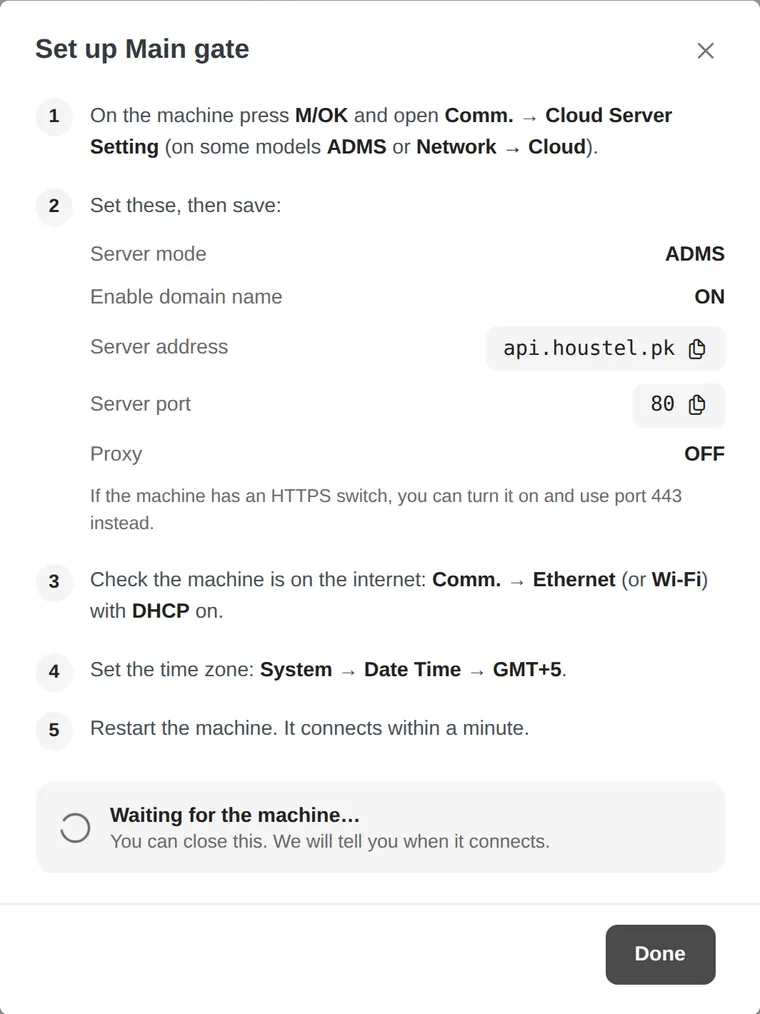
Type our address into it
On the machine, open Comm., then Cloud Server Setting. Houstel shows the exact values to type, ready to copy.
Match the people already on it
Houstel reads the machine's own list and matches it to your residents, so nobody enrols again.
Watch the scans arrive
The machine shows as Online within a minute. Every scan after that appears on your phone.
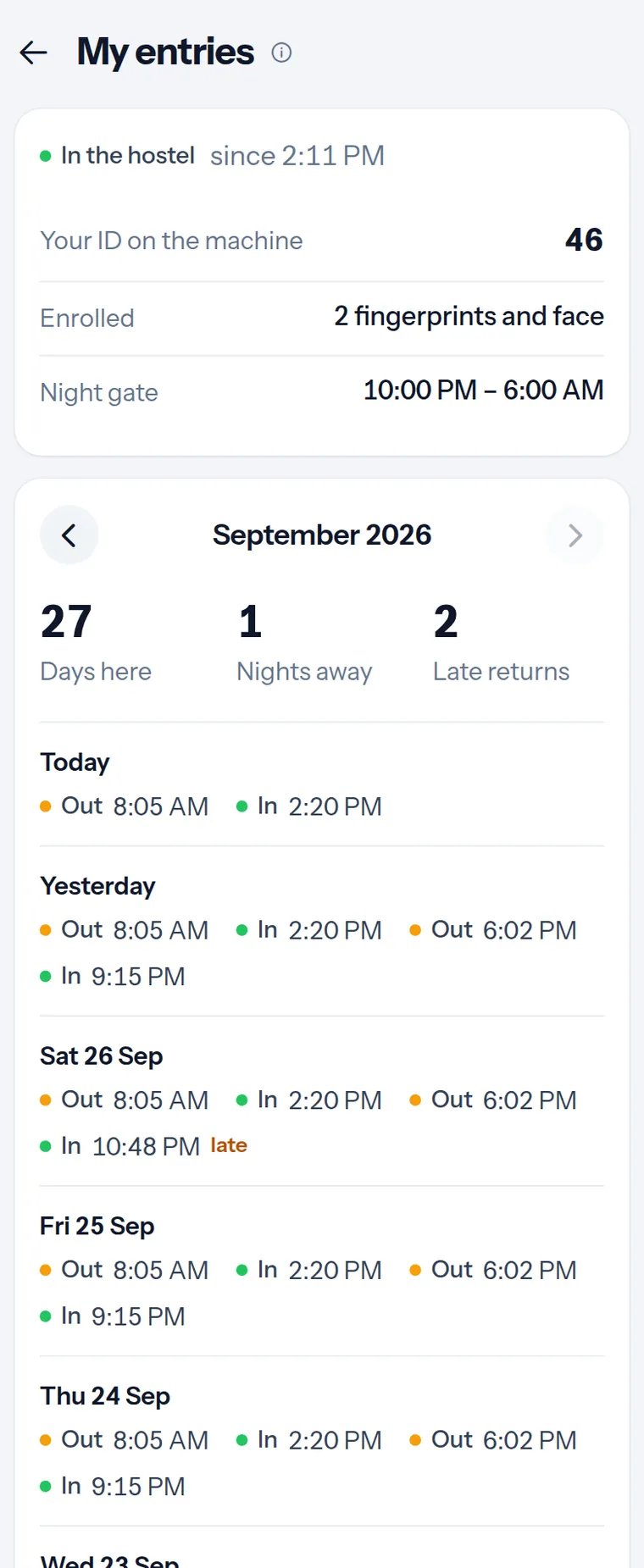
Residents see their own entries
If you allow it, each resident sees their own entries and exits in their Houstel app: whether they are in, their ID on the machine, and their month day by day. Nobody else's.
Residents who press Going out in their app, with a return date, are not counted as missing at night. When they scan back in, their trip is closed for you.
One price, on the bill you already pay
Attendance is added to your Houstel subscription. One bill, one renewal date.
- Every machine and door at the branch included
- Residents added to and removed from your machines for you
- First 30 days free
- Nothing charged until a machine is connected
- Unlimited residents, staff and scans
Not on Houstel yet?
Attendance works with Houstel's hostel management system: rooms, residents, rent, dues and your listing. Listing your hostel is free, and so is running it while up to 20 residents live with you.
Schools, offices, restaurants and hotels
Houstel attendance is built for hostels today. We are opening it to other businesses that need to know who came in and when. Tell us about yours below and we will set it up with you.
Schools and academies
Student and teacher attendance from the gate machine.
Offices and factories
Staff arrival and leaving times, late marks and monthly records.
Restaurants
Shift attendance for kitchen and floor staff.
Hotels and guest houses
Staff attendance and who came through which door.
Questions owners ask
Which attendance machines work with Houstel?
ZKTeco machines with a Cloud Server or ADMS setting (K40, K50, MB160, MB360, SpeedFace, uFace, iClock and similar), including eSSL and Granding machines built on them; Hikvision face and fingerprint terminals (DS-K1T series) with HTTP listening; any machine that can send data to a web address; and any machine with a USB port, by uploading its attendance log.
Do I need a computer or software at the hostel?
No. The machine sends its scans straight to Houstel over the internet. There is nothing to install and no port to open on your router.
What happens during load shedding or when the internet is down?
The machine keeps every scan and sends them when it is back online. Nothing is lost, and you get one message if a machine is offline for more than 30 minutes.
Can I use more than one machine?
Yes. Add every door and place: main gate, back gate, a wing door, the mess, the staff room. Each machine can be for everyone, residents only, staff only, or people you choose, and a fingerprint enrolled on one machine is copied to the others.
How do I know who came back late?
Set your gate closing time. Anyone coming in after it is marked late, and you can get one message a night listing residents who are not back yet.
My residents are already enrolled on the machine. Do they enrol again?
No. Houstel reads the people already on the machine and matches them to your residents. Their fingerprints keep working.
Can residents see their own entries?
Yes, if you allow it. Each resident sees only their own entries and exits in their Houstel account, never anybody else's.
How much does it cost?
Rs 2,000 a month per hostel or branch, added to your Houstel subscription. Every machine and door at that branch is included. The first 30 days are free, and nothing is charged until a machine is connected.
Is it only for hostels?
It is built for hostels today. We are opening it to schools, offices, restaurants and hotels: leave your details on this page and we will set it up with you.
Get started
Already on Houstel? Open Residents, then Attendance in your dashboard and press Get attendance. Otherwise, leave your details and we will call you, check your machine and set it up with you.
Thank you
We will call you within one working day to check your machine and set it up.