All guide chapters
Start here
Everyday running
- Residents
- Rent and payments
- Dues and reminders
- Deposits and advances
- Expenses and profit
- Mess and meals
- Reports and dashboard
- Laundry and food for residents
- Importing residents safely
- Room changes, checkout and resident requests
- Payment approvals
- Billing periods, installments and rent reviews
- Room electricity and resident charges
- Utility connections and bills
- Inventory and room assets
- Bank accounts and wallets
Filling your beds
Your team and residents
Adding your hostel
Your hostel profile is what people see before they call you. Fill it in once, properly, and it works for you every day after that.
Step by step
Where to go: My Hostel → Edit hostel
Who can use it: The hostel owner, or staff with access to this feature. Some actions need additional permission.
-
Claim a listing already on Houstel.pk
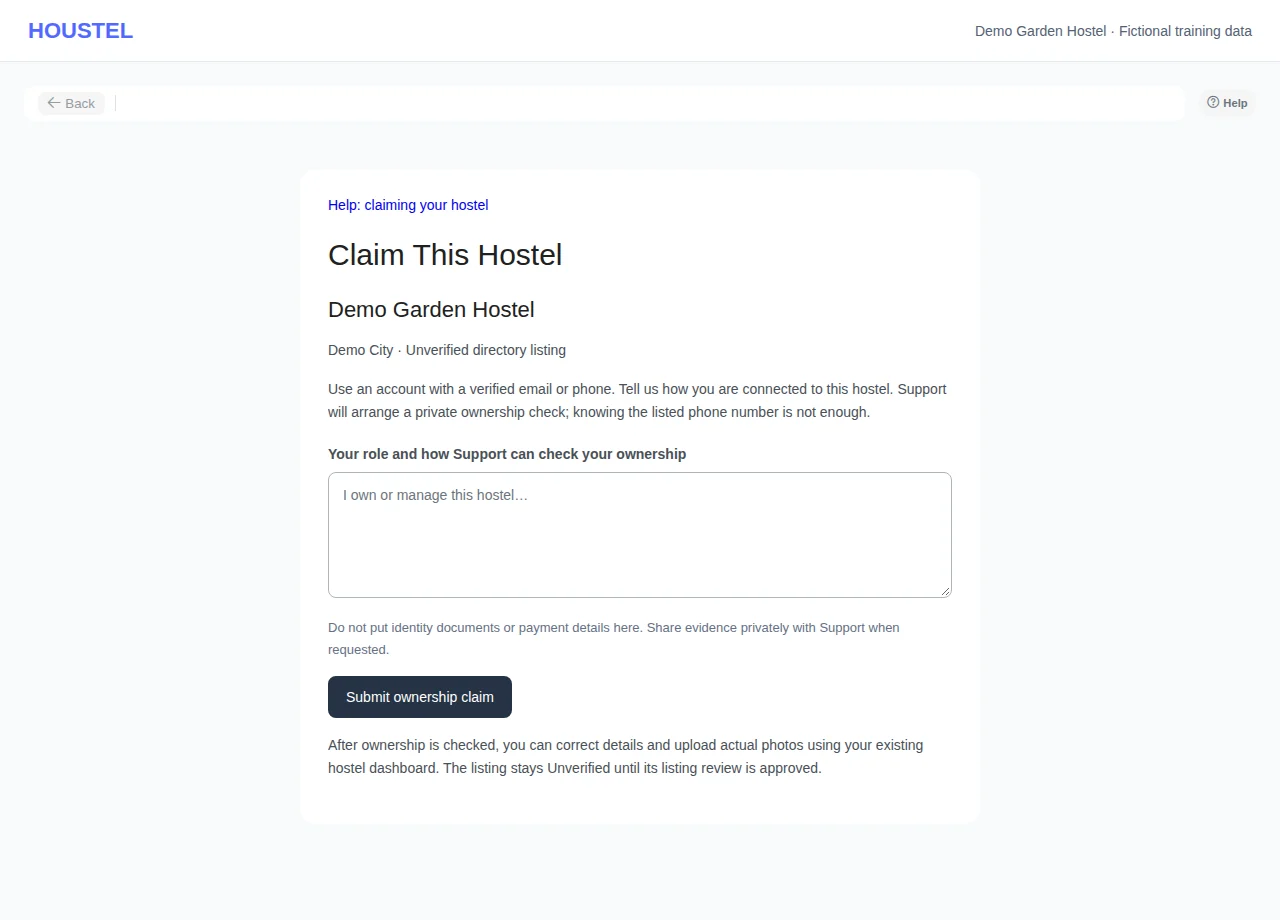
Open Claim This Hostel on the unverified public page. Sign in with a verified email or phone, explain your role and submit. Continue in the private Support conversation; editing access follows an ownership check, and listing approval is separate.
Claim a listing already on Houstel.pk · Example with dummy data. Select the image to enlarge. -
Fill the public profile
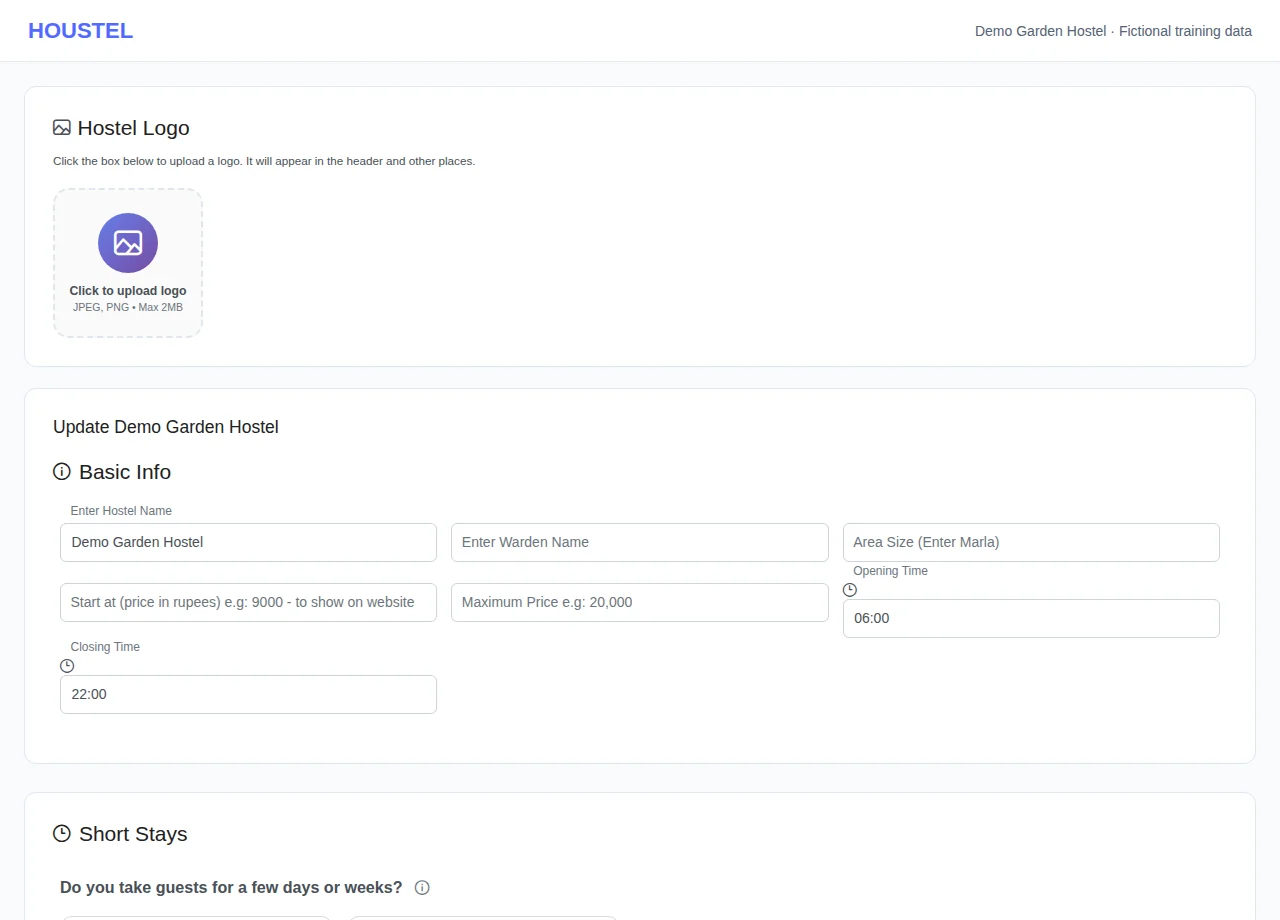
Enter accurate hostel details and check the location, type, rules, facilities and public contacts. Save and read any validation errors.
Fill the public profile · Example with dummy data. Select the image to enlarge. -
Review the advert
Reopen hostel details and check the public preview. Use the appearance and announcement guide for themes, short stays, social links and QR sharing.
Before you finish, and when something goes wrong
- Choose the correct branch before editing. Profile data intended for visitors must not include resident records or private office information.
- An ownership claim is reviewed privately in Support. Account verification is required; an open repeated claim reuses the conversation. Ownership grants editing access but does not approve the listing.
If a save times out, check the record before repeating it. If access is denied, ask the owner to review your hostel assignment and permissions. Never share your login to work around an access restriction.
Related help
Claim an existing Unverified listing
If your hostel already appears as Unverified, open its public page and choose Claim This Hostel. Sign in, or create an account, and verify your email or phone. Explain your role and how Support can check your ownership, then choose Submit ownership claim. Do not create a second listing for the same building.
A successful submission opens a private Support conversation; it does not give immediate editing access or approve the listing. Open that conversation for questions and the result. Support uses its usual dashboard notifications and email preferences. Do not put identity documents or payment information in the claim explanation; arrange any evidence privately with Support.
Once ownership is checked, the hostel appears in My Hostels. Use the existing details, Images, Floors and Rooms screens to correct the address and map pin, upload at least three actual hostel photos, and add a floor and room. Ask Support to review the completed listing. It remains Unverified, with illustrative public images and no visit or reservation promises, until that listing review is approved. Approval and ownership are separate checks.
If the account is not verified, complete verification before retrying. An unavailable or already claimed listing cannot be claimed again; contact Support about an ownership dispute. Repeating an open claim from the same account returns the existing conversation. Wait after the submission limit is reached. If the connection fails, check Support for an existing conversation before retrying. An owner who has reached the hostel limit must contact Support.
Open My Hostel in the sidebar and work down the form. Nothing here is permanent, and you can come back and change any of it, but the fields below are the ones that decide whether somebody scrolling past stops and calls you.
The basics
| Field | What to put, and why it matters |
|---|---|
| Hostel name | The name on your board. Not “Boys Hostel Lahore”. People search for the area, and a real name is what they remember and recommend. |
| Boys or girls | This is one of the first filters people use. Get it wrong and you will get calls you cannot serve, and miss the ones you can. |
| Address and map pin | Write the address as you would give it to a rickshaw driver, then drag the pin onto your actual gate. The pin is what puts you in “hostels near me” results. |
| Phone numbers | Add the number you answer. You can add several (phone, WhatsApp, landline and an emergency number) and mark which is which. |
| Description | Four or five honest sentences: who the hostel suits, what the area is near, what makes it worth the rent. See below. |
A pin dropped on the wrong street means visitors ring you lost, and it quietly removes you from results for people searching your own neighbourhood. Zoom right in and put it on the building.
Writing the description
This is the paragraph people read when they are deciding between you and two other hostels. Write it for a nervous parent and a student on a budget at the same time.
What works:
- Name the landmarks you are near: the university, the hospital, the metro stop, the main market. That is what people search for.
- Say who it suits: medical students, working women, people who need a quiet room to study in.
- Mention what is actually included, such as mess, WiFi, backup and laundry, rather than adjectives about comfort.
- Be honest about what you do not have. It saves you the visits that were never going to end in a booking.
Facilities
Tick only what you really provide. Facilities are one of the strongest filters people use, so a wrongly ticked box brings you visitors who will be annoyed when they arrive, and an unticked one you do provide loses you people who would have stayed.
The list covers the things residents ask about most:
- Food. Mess once, twice or three times a day, or none. You will set later whether it is included in rent or charged on top.
- Power. UPS, generator, both, or none. In most of Pakistan this is the second question after price.
- Rooms. Furnished, semi-furnished or unfurnished; attached or common bathroom; AC, air cooler, heater, geyser.
- The building. WiFi, kitchen access, filtered water, fridge, TV, washing machine, laundry and ironing, lawn.
- Security. Guard, CCTV.
- Parking. Car, bike, both or none, and whether it is inside the gate or on the street. Say “inside” only if it really is.
Timings and house rules
Add your gate timings and your rules: the curfew, the guest policy, the notice period, what happens to the deposit. Putting them on the listing does two things: it filters out people who will not accept them, and it means nobody can claim later that they were never told.
Rules can be written in English, Roman Urdu or Urdu, whichever your residents actually read.
Nearby places
Add the universities, hospitals, offices and stops that are close to you, with rough distances. Almost nobody searches for a hostel by street name; they search “hostel near X”. Each nearby place you add is another way to be found by somebody who has never heard of your hostel.
If you run more than one building
Add each building as its own hostel rather than squeezing them into one. Rooms, residents, rent, expenses and reports all stay separate, which is what you want the day you need to know whether the second branch is actually making money. You switch between them from the top of the sidebar, and one plan can cover several branches together.
Your logo and colours
On a paid plan you can add your hostel's logo and pick a colour, and they appear on the receipts and emails your residents receive. It is a small thing that makes a hostel look like a business rather than a landlord with a register.
What happens next
When you save, your hostel goes to our team for a check. That normally takes under a working day, and you can carry on adding rooms and photos while you wait, because approval controls your verified public listing.
In short
- Name, boys or girls, address, map pin and a working phone number are the fields that matter most.
- Drag the map pin onto your actual gate. It decides who finds you locally.
- Tick only the facilities you really have; wrong ticks cost you more than missing ones.
- Add nearby landmarks: “hostel near X” is how people actually search.
- Put your rules on the listing so nobody can say they were not told.
- One building = one hostel. You can run several from the same login.
Common questions
Can I run more than one hostel from one account?
Yes. Add each building as its own hostel and switch between them from the top of the sidebar. Rooms, residents, rent and reports stay completely separate per hostel.
Can I change the details later?
Yes, any time, from My Hostel. Changes to an approved hostel go live without needing approval again.
Still stuck?
Tell us the screen name, what you tried and what happened. Remove personal details, passwords and private links from any screenshot.